PM Skills Hub
I built PM Skills Hub to solve a problem I kept running into: product managers are using Claude Code skills constantly, for research, writing documents, communications, and more; but sharing those skills with each other is surprisingly hard. Most skills are tailored to a specific company, codebase, or workflow, which makes them difficult to hand off without a lot of manual cleanup. I wanted to fix that.
The Problem with Skills Today
Skills for AI agents have become a core part of how PMs work. Whether you're in your day job or working on side projects, there's a skill for almost everything. But sharing them is another story.
You could dump them all into a GitHub repo, but then someone else has to figure out how to make them work for their context. Other skill libraries exist, but they're not segmented for product managers and they often have thousands of entries with no real curation. And crucially, when someone shares a skill, it's usually tied to their specific company, their specific codebase, their specific tools. The person downloading it has to reverse-engineer all of that customization before it's useful to them.
I wanted to build something that solved all three of those problems at once: a curated, PM-specific catalog with a workflow that handles the customization problem automatically.
The Solution: A Skill Marketplace Backed by GitHub
PM Skills Hub is a web application where product managers can browse, preview, download, and contribute Claude Code skills. The backend is entirely GitHub: skills are stored as
files in a public repository, contributions are submitted as pull requests (abstracted away from the user, no Git knowledge required), and a registry.json index file
powers the frontend catalog.
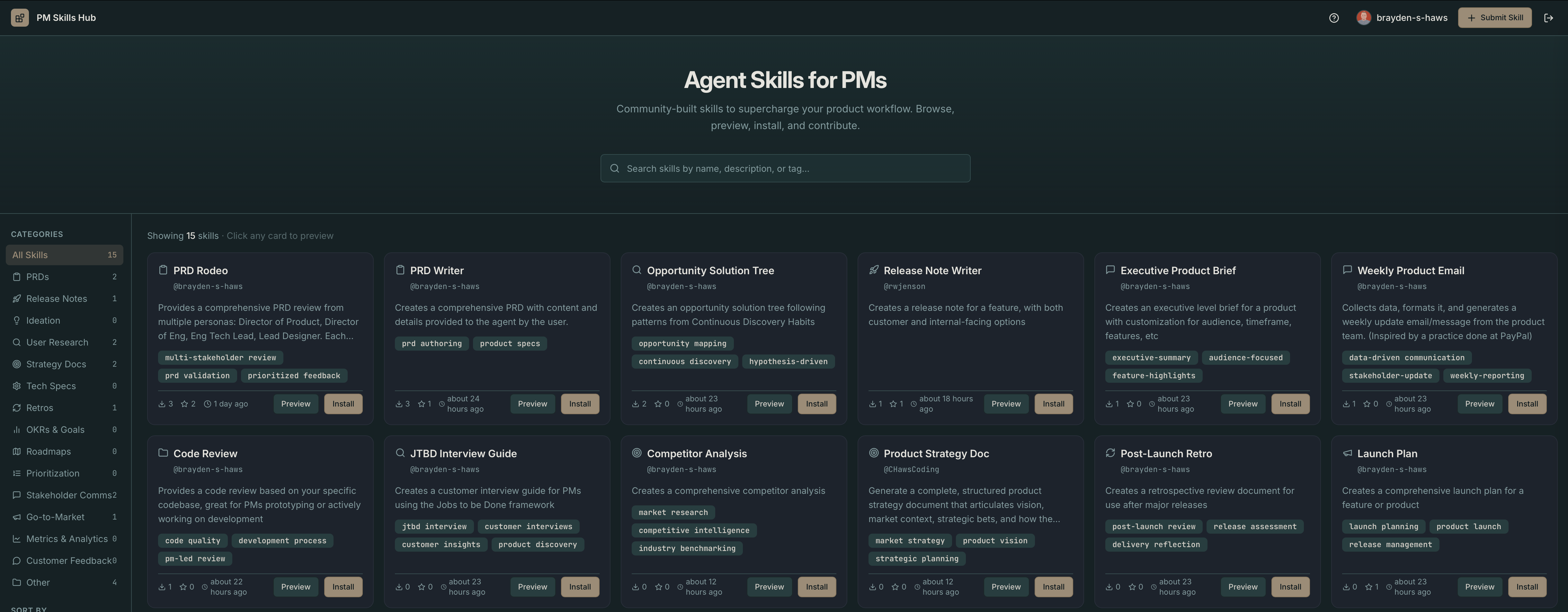
Skills are organized into categories: PRDs, Release Notes, Ideation, User Research, Strategy, Tech Specs, Retros, and OKRs. PMs can quickly find what's relevant to their current work. Browsing, searching, previewing, and downloading all work without any login. You only need to sign in with GitHub when you want to submit a skill or star one you find useful.
Browsing and Previewing Skills
The main interface is a searchable, filterable catalog. You can filter by category, sort by most downloaded or most starred, and do a real-time fuzzy search across skill names, descriptions, and tags. When you find something interesting, clicking the card opens a preview panel that slides in from the right.
Inside the preview panel, you get three views of the skill: a rendered markdown preview that shows you exactly how the skill is formatted and structured, a raw SKILL.md tab where you can copy the full text, and a CONFIG.md tab that explains how to customize the skill for your specific team and context. That last tab is something I'm particularly proud of, more on it below.
When you're ready to install a skill, you download a ZIP file containing both the SKILL.md skill itself and the CONFIG.md customization guide. You unzip it into your Claude Code skills directory and you're done. One of the best ways to get started is to point your agent at the CONFIG.md file and ask it to review the customization options and tailor the skill to your specific context, it can make quick work of filling in the details that would otherwise take you time to track down.
The AI Adaptation Pipeline
This is the core innovation of the project. When someone submits a skill, it goes through an AI processing step before it's posted to the marketplace. The Anthropic API analyzes the uploaded skill and does four things: it replaces company names and product references with generic terms, anonymizes employee names and replaces them with role descriptions, updates internal URLs with placeholder equivalents, and broadens hardcoded tool configurations to support multiple tools (for example, turning a hardcoded Jira project key into an option that works with Jira, Linear, or GitHub Issues).
The contributor then sees a review screen that shows exactly what changed. They can accept the adapted version, edit it further, or go back and start over. Nothing gets submitted without the contributor's explicit sign-off.
Alongside the adapted SKILL.md, the AI also generates a CONFIG.md file that serves as a customization guide for whoever downloads the skill. It explains what was generalized and why, shows before/after examples, and tells you exactly what to replace with your own values. So when you download a skill, you're not just getting a generic template, you're getting a map that shows you how to make it yours.
The Submission Flow
Submitting a skill is a four-step guided process. You fill in the skill name, description, category, and tags, then upload your SKILL.md file. The app immediately scans it for security issues, if there are bash scripts or other potentially problematic content, it flags them before anything else happens. Once the file is clean, the AI adaptation pipeline runs.
After you review and approve the adapted version, submitting triggers a GitHub Action that creates a pull request in the hub repository with the adapted SKILL.md and the generated CONFIG.md. I review the PR, and once it's merged, a second GitHub Action automatically rebuilds the registry, which is what powers the frontend catalog. Your skill shows up live within a few hours of being merged.
How the Backend Works
The backend is almost entirely GitHub, combined with a small database and server. Each skill lives in a folder under its category, containing the SKILL.md and CONFIG.md files. The manifest stores metadata like the author, version, tags, download count, and an array of GitHub usernames who have starred the skill.
Two GitHub Actions do the heavy lifting. The first runs on every pull request and validates the submission: it checks that all required files are present, that the skill content
meets minimum length requirements, and that there are no duplicate skills. The second runs on every merge to main and rebuilds the registry.json file, reading every
skill's SKILL.md content and merging it into a flat array, then committing the updated file. The frontend fetches this single file on load and handles all filtering and search client-side, with no per-skill API calls needed.
Authentication is GitHub OAuth, which also gives the app the permissions it needs to create forks and pull requests on behalf of contributors. The app stores only the user's public profile on the client side, the OAuth token never leaves the server.
See It in Action
Here's a walkthrough of the full experience: browsing the catalog, previewing a skill, and going through the submission flow including the AI adaptation step:
What I Learned Building This
Using GitHub as a backend was the right call for this project. It gave me version history, a built-in review workflow, automated CI/CD through Actions, and a public audit trail for every skill submission. The main constraint is rate limits, which become relevant if the app ever gets real traffic. But for an MVP, it's a clean architecture that removes a lot of complexity.
The hardest design problem was the adaptation pipeline. Writing the system prompt for the Anthropic API required a lot of iteration to get the right balance: aggressive enough to catch company-specific references, but conservative enough not to strip out legitimate generic PM content. The key was being explicit about what to preserve (standard PM frameworks like RICE and JTBD, universally applicable tool names like Jira and Slack when offered as options) versus what to replace (hardcoded specific instances of those same tools).
The CONFIG.md concept turned out to be one of the most valuable parts of the project. It transforms the act of downloading a skill from a guessing game into a guided setup process. I hadn't fully planned it from the start, it emerged as I thought about what a downloader actually needs to make a skill useful. Sometimes the best features come from following the user's journey all the way to the end.
Want to browse the catalog or share a skill of your own? The app is live and open to contributions.